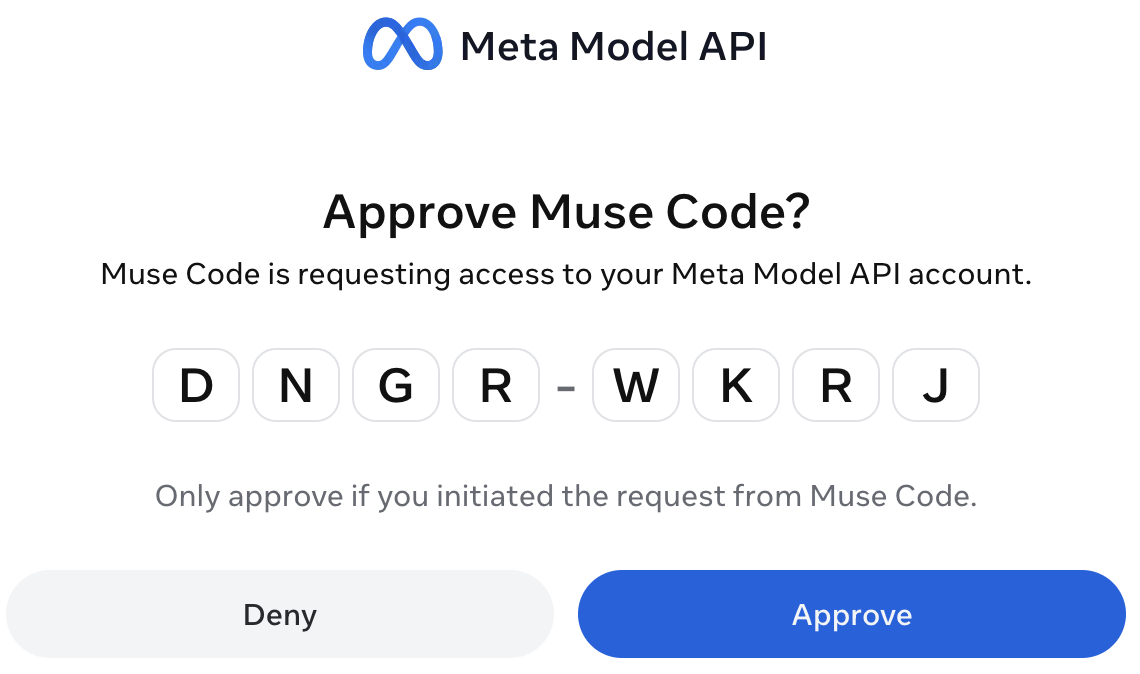
Using Claude Code with Muse Spark Subscription
Run Claude Code on Meta's $6.99/mo Muse Spark subscription by minting a Model API key with the OAuth flow learned from Pi.
The Situation
Meta recently released Muse Spark 1.3. It’s highly capable and very cheap. The lowest tier of the Muse Code subscription is only $6.99 CAD / month, which makes it a good fallback for when my Anthropic Max subscription hits its limit mid-week.
Why Not Just Use NVIDIA NIM?
In a previous post I set up Claude Code on NVIDIA NIM, and that setup is still great. It’s free, and deepseek-4.1-flash is a solid workhorse model. The catch is speed: NIM’s free tier can be slow, and waiting through a long agentic session adds up. What I wanted was a fast, reliable backup for when my Anthropic limit runs out. At $6.99 CAD/month, Muse Spark is cheap enough to keep around for exactly that.
The Meta developer console even has a Claude Code section on its dashboard, so I expected setup to take five minutes. It didn’t.
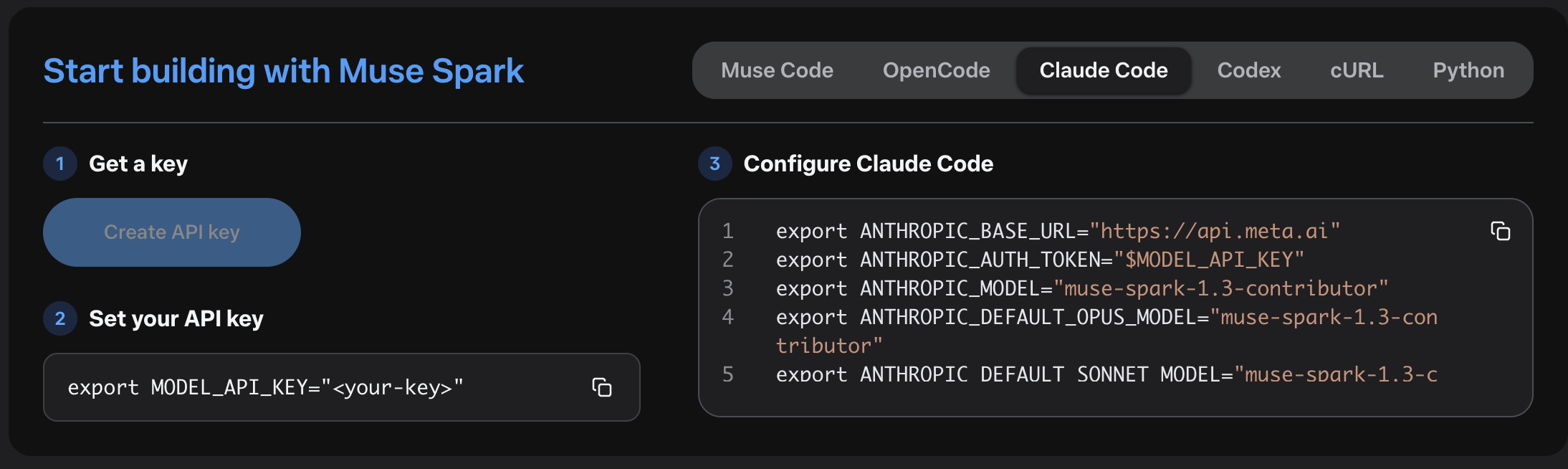
The Problem: No API Key for Subscription Projects
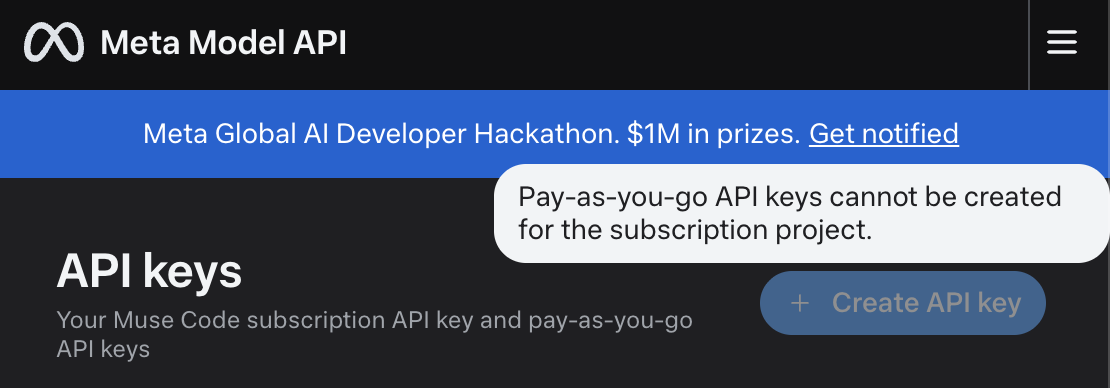
After subscribing to Muse Code, I went to the Meta Developer portal to create an API key for Claude Code. The portal refused:
1
Pay-as-you-go API keys cannot be created for the subscription project.
So the subscription includes Claude Code access, but you can’t create the API key that Claude Code needs to authenticate. API keys are only for pay-as-you-go projects.
The Clue: Pi Can Already Do It
I then noticed that the Pi coding agent can connect to a Muse Code subscription directly with /login meta. If Pi can get a working credential out of the subscription, so can we.
I pointed Pi at its own source code and had it reverse-engineer the Meta login flow. It turns out to be a standard OAuth device flow (RFC 8628), plus one extra step that mints a short-lived Model API key from your Meta identity token. The script in this post does the same thing without needing Pi:
sequenceDiagram
participant U as You
participant S as meta-mint-key.sh
participant A as auth.meta.com
participant K as api.meta.ai/muse-code/key
Note over U,K: One-time: meta-mint-key.sh --login
S->>A: POST /oidc/device/authorization/ (client_id)
A-->>S: user_code + verification URL
U->>A: Open URL, enter code, approve
S->>A: Poll /oidc/device/token/
A-->>S: identity token
Note over S: Saved to ~/.uright-meta-auth.json
Note over U,K: Every launch: meta-mint-key.sh
S->>K: POST (Bearer identity token)
K-->>S: api_key "LLM|..." (valid ~24h, cached)
The details that matter:
- The identity token from the device flow can’t be used for inference. It’s only good for minting keys.
POST https://api.meta.ai/muse-code/keywithAuthorization: Bearer <identity token>returns{ "api_key": "LLM|..." }.- That minted key behaves exactly like a regular
META_API_KEYand is valid for about 24 hours. - The identity token cannot be refreshed. Once it expires, you sign in again.
Credit where it’s due: everything here comes from the work of the Pi coding agent team. Their Meta OAuth implementation (
packages/ai/src/auth/oauth/meta.ts) is the reference for this script. If you want a full coding agent that supports Muse Code out of the box, use Pi.
Prerequisites
- An active Muse Code subscription on Meta
- Claude Code CLI installed
curlandjq(the script falls back tonodeifjqisn’t installed)- macOS or Linux. I’ve tested the script on macOS.
Step 1: Save the Key-Minting Script
The script does two jobs:
--loginsigns in with your Meta account (a one-time step) and saves the identity token to~/.uright-meta-auth.jsonwith0600permissions.- Without flags, it prints a valid key. It reuses the cached key if it’s valid for at least another 5 minutes. Otherwise it mints a fresh one and caches it. It prints only the key to stdout, so you can use it in command substitution.
Save it as ~/bin/meta-mint-key.sh:
1
2
3
4
5
6
7
8
9
10
11
12
13
14
15
16
17
18
19
20
21
22
23
24
25
26
27
28
29
30
31
32
33
34
35
36
37
38
39
40
41
42
43
44
45
46
47
48
49
50
51
52
53
54
55
56
57
58
59
60
61
62
63
64
65
66
67
68
69
70
71
72
73
74
75
76
77
78
79
80
81
82
83
84
85
86
87
88
89
90
91
92
93
94
95
96
97
98
99
100
101
102
103
104
105
106
107
108
109
110
111
112
113
114
115
116
117
118
119
120
121
122
123
124
125
126
127
128
129
130
131
132
133
134
135
136
137
138
139
140
141
142
143
144
145
146
147
148
149
150
151
152
153
154
155
156
157
158
159
160
161
162
163
164
165
166
167
168
169
170
171
172
173
174
175
176
177
178
179
180
181
182
183
184
185
186
187
188
189
190
191
192
193
194
195
196
197
198
199
200
201
202
203
204
205
206
207
208
209
210
211
212
213
214
215
216
217
218
219
220
221
222
223
224
225
226
227
228
229
230
231
232
233
234
235
236
237
238
239
240
#!/usr/bin/env bash
# Mint a Meta Model API key from a Muse Code subscription, for use as META_API_KEY.
#
# Login flow adapted from the Pi coding agent (https://github.com/earendil-works/pi),
# packages/ai/src/auth/oauth/meta.ts.
#
# First run `meta-mint-key.sh --login` once: it signs in with your Meta account
# via the OAuth device flow and stores the identity token in
# ${META_AUTH_FILE:-~/.uright-meta-auth.json} (mode 0600). After that, each run
# reuses the cached key while it's still valid, and otherwise mints a fresh
# ~24h key via POST https://api.meta.ai/muse-code/key and caches it.
#
# Prints the key to stdout (nothing else) so it composes:
#
# export META_API_KEY="$(meta-mint-key.sh)"
# meta-mint-key.sh --export
# meta-mint-key.sh --exec -- my-command --flag
#
# Requires: curl plus jq or node for JSON parsing.
set -euo pipefail
CLIENT_ID="1031625952748946" # Muse Code CLI OAuth client
DEVICE_AUTH_URL="https://auth.meta.com/oidc/device/authorization/"
DEVICE_TOKEN_URL="https://auth.meta.com/oidc/device/token/"
MINT_URL="https://api.meta.ai/muse-code/key"
KEY_LIFETIME_SECS=86400 # minted keys last ~24h
SAFETY_MARGIN_SECS=300 # reuse cached key only if valid for 5+ more minutes
CURL_TIMEOUT=30
STORE_FILE="${META_AUTH_FILE:-$HOME/.uright-meta-auth.json}"
LOGIN=0
FORCE_MINT=0
EMIT_EXPORT=0
EXEC=0
usage() {
cat <<'EOF'
Usage: meta-mint-key.sh [--login] [--force-mint] [--export] [--exec -- <cmd>...]
(no flags) print a valid Meta Model API key to stdout
--login sign in with your Meta account (one-time; again when the session expires)
--force-mint skip the cached key, always mint a fresh one
--export print export META_API_KEY='<key>' instead of the bare key
--exec run <cmd>... with META_API_KEY set (key never touches history)
-h, --help show this help
EOF
}
die() { echo "error: $*" >&2; exit 1; }
while [ $# -gt 0 ]; do
case "$1" in
--login) LOGIN=1; shift ;;
--force-mint) FORCE_MINT=1; shift ;;
--export) EMIT_EXPORT=1; shift ;;
--exec) EXEC=1; shift; break ;; # rest (after optional --) is the command
-h | --help) usage; exit 0 ;;
*) echo "error: unexpected argument: $1" >&2; usage >&2; exit 2 ;;
esac
done
if [ "$EXEC" = "1" ]; then
if [ "${1:-}" = "--" ]; then shift; fi
if [ $# -eq 0 ]; then echo "error: --exec needs a command" >&2; exit 2; fi
fi
command -v curl >/dev/null || die "curl is required"
# JSON helpers: jq preferred, node fallback.
# jget <file> <dotted.path> prints the scalar value, or nothing when absent/null
# jerror_detail <file> prints the most useful error message field
# jcredential prints the credential JSON built from $CRED_* env vars
if command -v jq >/dev/null; then
jget() { jq -r "$2 // empty" "$1" 2>/dev/null; }
jerror_detail() { jq -r '.error_description // .detail // .message // .error // empty' "$1" 2>/dev/null; }
jcredential() {
jq -n '{meta: {type: "oauth", refresh: env.CRED_REFRESH, access: env.CRED_ACCESS,
expires: (env.CRED_EXPIRES | tonumber)}}'
}
elif command -v node >/dev/null; then
jget() {
node -e '
const fs = require("fs");
let v = JSON.parse(fs.readFileSync(process.argv[1], "utf8"));
for (const k of process.argv[2].replace(/^\./, "").split(".")) v = v == null ? v : v[k];
if (v != null && typeof v !== "object") process.stdout.write(String(v));
' "$1" "$2" 2>/dev/null
}
jerror_detail() {
node -e '
const fs = require("fs");
const d = JSON.parse(fs.readFileSync(process.argv[1], "utf8"));
for (const k of ["error_description", "detail", "message", "error"]) {
if (typeof d[k] === "string" && d[k]) { process.stdout.write(d[k]); break; }
}
' "$1" 2>/dev/null
}
jcredential() {
node -e '
const e = process.env;
const meta = { type: "oauth", refresh: e.CRED_REFRESH, access: e.CRED_ACCESS, expires: Number(e.CRED_EXPIRES) };
process.stdout.write(JSON.stringify({ meta }, null, 2) + "\n");
'
}
else
die "jq or node is required for JSON parsing"
fi
# ": <detail>" from an error response body, or nothing.
detail() {
local d
d="$(jerror_detail "$1")"
if [ -n "$d" ]; then printf ': %s' "$d"; fi
}
# positive_int <value> <default>
positive_int() {
if [[ "$1" =~ ^[0-9]+$ ]] && [ "$1" -gt 0 ]; then echo "$1"; else echo "$2"; fi
}
TMP="$(mktemp)"
trap 'rm -f "$TMP"' EXIT
# http_post <url> [curl args...]: body goes to $TMP, prints the HTTP status.
http_post() {
local url="$1"; shift
curl -sS -o "$TMP" -w '%{http_code}' -X POST "$url" \
-H "Accept: application/json" --max-time "$CURL_TIMEOUT" "$@"
}
# save_credential <identity> <key> <expires-epoch-ms>: atomic write, mode 0600.
save_credential() {
local tmp
tmp="$(mktemp "$STORE_FILE.XXXXXX")" # mktemp creates files as 0600
CRED_REFRESH="$1" CRED_ACCESS="$2" CRED_EXPIRES="$3" jcredential >"$tmp"
mv "$tmp" "$STORE_FILE"
}
# RFC 8628 device flow. Sets IDENTITY to the Meta identity token.
login() {
local status device_code user_code uri interval expires_in deadline
status="$(http_post "$DEVICE_AUTH_URL" --data-urlencode "client_id=$CLIENT_ID")" ||
die "device authorization request failed (network/curl error)"
[ "${status:0:1}" = "2" ] || die "Meta device authorization failed with status $status$(detail "$TMP")"
device_code="$(jget "$TMP" '.device_code')"
user_code="$(jget "$TMP" '.user_code')"
uri="$(jget "$TMP" '.verification_uri_complete')"
[ -n "$uri" ] || uri="$(jget "$TMP" '.verification_uri')"
[ -n "$device_code" ] || die "Meta did not return a device code"
[[ "$uri" =~ ^https?:// ]] || die "Meta returned an invalid verification URL"
interval="$(positive_int "$(jget "$TMP" '.interval')" 5)"
expires_in="$(positive_int "$(jget "$TMP" '.expires_in')" 600)"
echo "Open this link and sign in with the Meta account that has Muse Code:" >&2
echo " $uri" >&2
echo "Enter code: $user_code" >&2
echo "Waiting for approval..." >&2
deadline=$(($(date +%s) + expires_in))
while :; do
sleep "$interval"
[ "$(date +%s)" -lt "$deadline" ] || die "Meta login code expired. Run --login again."
status="$(http_post "$DEVICE_TOKEN_URL" \
--data-urlencode "grant_type=urn:ietf:params:oauth:grant-type:device_code" \
--data-urlencode "device_code=$device_code" \
--data-urlencode "client_id=$CLIENT_ID")" ||
die "device token request failed (network/curl error)"
IDENTITY="$(jget "$TMP" '.access_token')"
if [ "${status:0:1}" = "2" ] && [ -n "$IDENTITY" ]; then return; fi
case "$(jget "$TMP" '.error')" in
authorization_pending) ;;
slow_down) interval="$(positive_int "$(jget "$TMP" '.interval')" $((interval + 5)))" ;;
access_denied) die "Meta login was denied." ;;
expired_token) die "Meta login code expired. Run --login again." ;;
*) die "Meta device token request failed with status $status$(detail "$TMP")" ;;
esac
done
}
# mint_key: exchanges $IDENTITY for a fresh Model API key in KEY.
mint_key() {
local status
# Auth header goes through stdin so the token doesn't show up in `ps`.
status="$(printf 'Authorization: Bearer %s\n' "$IDENTITY" | http_post "$MINT_URL" \
-H @- \
-H "Content-Type: application/json" \
-H "x-api-version: 1.0.0" \
-d '{}')" || die "mint request failed (network/curl error)"
if [ "$status" = "401" ] || [ "$status" = "403" ]; then
die "Meta session expired (status $status)$(detail "$TMP"). Run: meta-mint-key.sh --login"
fi
[ "${status:0:1}" = "2" ] || die "Meta API key mint failed with status $status$(detail "$TMP")"
KEY="$(jget "$TMP" '.api_key')"
if [ -z "$KEY" ]; then
local action
action="$(jget "$TMP" '.action_url')"
die "Meta did not issue an API key${action:+. Complete setup at $action}"
fi
}
KEY=""
if [ "$LOGIN" = "1" ]; then
login
FORCE_MINT=1
else
[ -f "$STORE_FILE" ] || die "not signed in. Run: meta-mint-key.sh --login"
IDENTITY="$(jget "$STORE_FILE" '.meta.refresh')"
[ -n "$IDENTITY" ] || die "no Meta identity token in $STORE_FILE. Run: meta-mint-key.sh --login"
fi
if [ "$FORCE_MINT" = "0" ]; then
CACHED="$(jget "$STORE_FILE" '.meta.access')"
EXPIRES_MS="$(jget "$STORE_FILE" '.meta.expires')" # epoch milliseconds
if [ -n "$CACHED" ] && [[ "$EXPIRES_MS" =~ ^[0-9]+$ ]] &&
[ $((EXPIRES_MS / 1000)) -gt $(($(date +%s) + SAFETY_MARGIN_SECS)) ]; then
KEY="$CACHED"
fi
fi
if [ -z "$KEY" ]; then
mint_key
save_credential "$IDENTITY" "$KEY" $((($(date +%s) + KEY_LIFETIME_SECS) * 1000))
fi
if [ "$LOGIN" = "1" ]; then
echo "Signed in. Credential saved to $STORE_FILE" >&2
exit 0
fi
rm -f "$TMP"
trap - EXIT
if [ "$EXEC" = "1" ]; then
META_API_KEY="$KEY" exec "$@"
elif [ "$EMIT_EXPORT" = "1" ]; then
printf "export META_API_KEY='%s'\n" "${KEY//\'/\'\\\'\'}"
else
printf '%s\n' "$KEY"
fi
Make it executable:
1
chmod +x ~/bin/meta-mint-key.sh
Step 2: Sign In with Meta
Run the one-time login:
1
~/bin/meta-mint-key.sh --login
1
2
3
4
5
Open this link and sign in with the Meta account that has Muse Code:
https://auth.meta.com/oauth/device/?code=ABCD-1234
Enter code: ABCD-1234
Waiting for approval...
Signed in. Credential saved to /Users/you/.uright-meta-auth.json
Open the link, sign in with the Meta account that holds your Muse Code subscription, and approve the code. The script waits for your approval, mints the first key, and saves both. Check that it returns a key:
1
~/bin/meta-mint-key.sh | cut -c1-4 # should print: LLM|
Step 3: Create the claude-muse Alias
Next, use the same alias pattern from my NVIDIA NIM post. Meta’s API accepts Claude Code’s Anthropic-style requests, so you don’t need a proxy. Point ANTHROPIC_BASE_URL at api.meta.ai and map every model slot to Muse Spark.
Add this to your ~/.zshrc (or ~/.bashrc):
1
2
3
4
5
6
7
8
9
10
alias claude-muse='\
ANTHROPIC_BASE_URL="https://api.meta.ai" \
ANTHROPIC_AUTH_TOKEN="$META_API_KEY" \
ANTHROPIC_MODEL="muse-spark-1.3-contributor" \
ANTHROPIC_DEFAULT_OPUS_MODEL="muse-spark-1.3-contributor" \
ANTHROPIC_DEFAULT_SONNET_MODEL="muse-spark-1.3-contributor" \
ANTHROPIC_DEFAULT_HAIKU_MODEL="muse-spark-1.3-contributor" \
CLAUDE_CODE_SUBAGENT_MODEL="muse-spark-1.3-contributor" \
ENABLE_TOOL_SEARCH="true" \
claude'
Here’s what each variable does:
| Variable | Purpose |
|---|---|
ANTHROPIC_BASE_URL | Sends Claude Code’s requests to Meta instead of Anthropic |
ANTHROPIC_AUTH_TOKEN | The minted Muse Code key, sent as a Bearer token |
ANTHROPIC_MODEL / ANTHROPIC_DEFAULT_*_MODEL | Maps the Opus, Sonnet, and Haiku slots to Muse Spark, so nothing asks for a Claude model name that Meta doesn’t know |
CLAUDE_CODE_SUBAGENT_MODEL | Subagents (Explore, Plan, etc.) use Muse Spark too |
ENABLE_TOOL_SEARCH | Loads MCP tool schemas only when they’re needed instead of sending them all up front |
Reload your shell:
1
source ~/.zshrc
Step 4: Launch It
Mint a key into your session, then start Claude Code:
1
2
export META_API_KEY="$(~/bin/meta-mint-key.sh)"
claude-muse
Run /status inside Claude Code to confirm that the base URL and model point to Meta.
Tips
Mint a fresh key on every launch. The key only lasts about 24 hours, so a terminal left open overnight will start getting 401s. Mint the key inside the alias instead of exporting it once. The single quotes delay the $(...) until the alias runs. Because the script caches the key, this costs nothing when the cached key is still valid:
1
2
3
4
5
6
7
8
9
10
alias claude-muse='\
ANTHROPIC_BASE_URL="https://api.meta.ai" \
ANTHROPIC_AUTH_TOKEN="$(~/bin/meta-mint-key.sh)" \
ANTHROPIC_MODEL="muse-spark-1.3-contributor" \
ANTHROPIC_DEFAULT_OPUS_MODEL="muse-spark-1.3-contributor" \
ANTHROPIC_DEFAULT_SONNET_MODEL="muse-spark-1.3-contributor" \
ANTHROPIC_DEFAULT_HAIKU_MODEL="muse-spark-1.3-contributor" \
CLAUDE_CODE_SUBAGENT_MODEL="muse-spark-1.3-contributor" \
ENABLE_TOOL_SEARCH="true" \
claude'
When you see Meta session expired (status 401). Your identity token has expired, and it can’t be refreshed. Run ~/bin/meta-mint-key.sh --login again.
When you see Complete setup at https://.... Meta accepted the login but wants something finished first, usually billing. Open the URL, finish setup, and run the script again.
Treat ~/.uright-meta-auth.json like a password. The identity token in it is the longest-lived secret in this setup. It’s saved as plain JSON with 0600 permissions. Don’t commit it, sync it, or paste the minted key into shell history. The script passes the token to curl through stdin, so it doesn’t show up in ps either.
Keep your Anthropic profile separate. Plain claude still uses your Anthropic Max login, so you can switch to claude-muse when you hit your limit and switch back when it resets. For free but slower sessions, claude-nim is still a good third option.
All Set!
For $6.99 CAD a month, Muse Spark 1.3 makes a fast backup for Claude Code. The only tricky part is the missing API key on subscription projects. A small script signs you in once, mints and caches a fresh key whenever you need one, and a shell alias does the rest. Big thanks to the Pi team for working out the Meta login flow first.